AI Onboarding Learning Hub
A guided, AI-assisted learning experience that walks new hires through Takanock’s Claude tools
During the summer of 2026, I interned at a startup called “Takanock.” This company is a renewable energy and data center infrastructure company based out of offices in Michigan, Maryland, and Texas. As the industry scales fast, teams at Takanock often grow faster than their internal tools and processes — which is exactly the gap this project addressed.
New hires at Takanock were handed dense PDFs about AI tools with no structure and no way to ask questions. I built a guided, chatbot-driven learning hub that walks people through Claude tools step by step — and logs every question asked, turning onboarding into something that keeps improving instead of a one-time document dump.
Overview
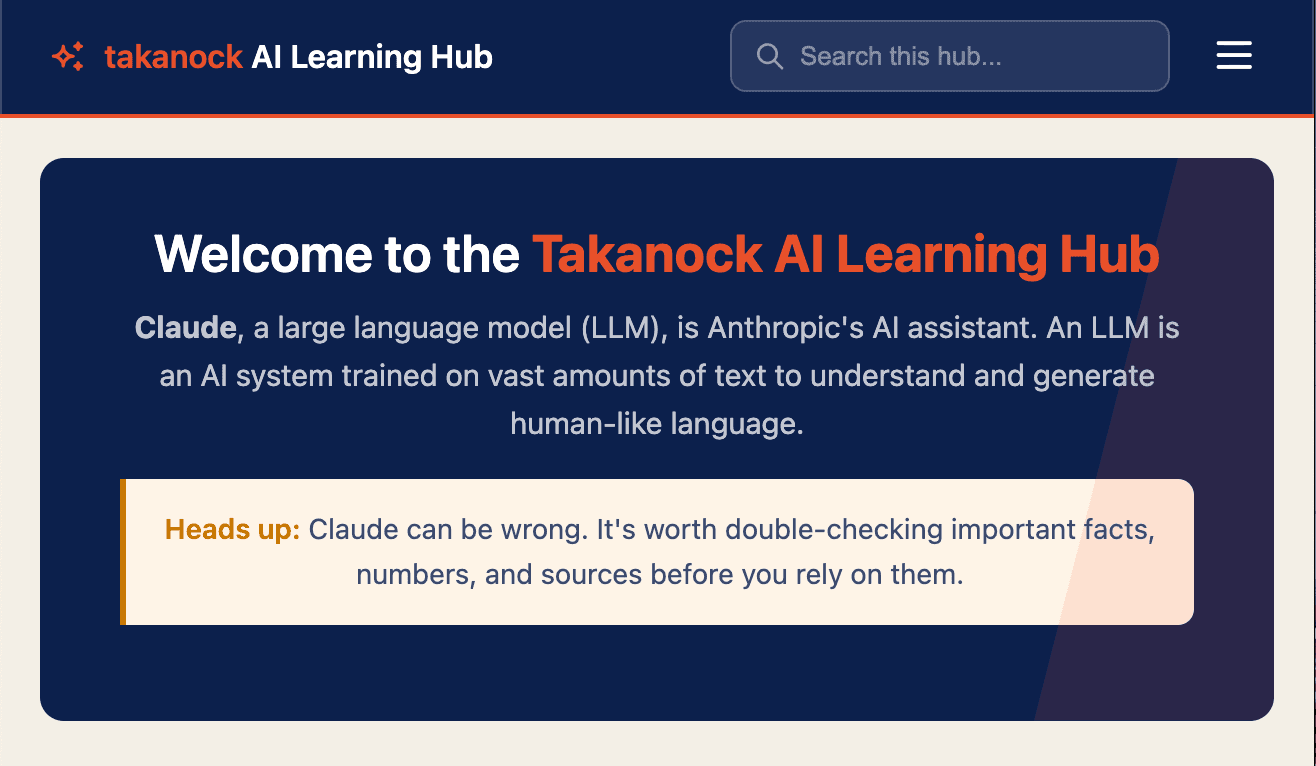
Takanock’s onboarding process relied heavily on overwhelming documents — PDFs new hires were expected to read through on their own, with no easy way to ask questions and no way to track what people actually understood versus what confused them. As part of my internship, I designed and built the AI Onboarding Learning Hub: a guided web-based learning experience that walks new hires through Claude tools and how they are implemented into the company, with a built-in chatbot to answer questions in real time and surface recurring pain points to the team.
- Role
- UX Design, Research, Vibe-coded Front-end Development
- Timeline
- 4 weeks
- Tools
- HTML/CSS/JS, Airtable, Claude Code, Vercel serverless functions, Claude API
The problem
Employees and new hires at Takanock were handed documents about AI implementation with no clear guideline of where to start and how to fit this learning into their incredibly busy schedules. This created a few specific issues:
No way to ask a clarifying question without interrupting a coworker
No visibility into which parts of onboarding were actually confusing people
No clear guidance or visual elements to aid with learning AI in the workplace
People are busy with their jobs and are unsure of where to begin learning Claude
Research
To understand the real pain points across this company before designing a solution, I conducted 16 semi-structured discovery interviews across departments — Commercial, Development, Finance, Legal, and Operations. Each interview explored current tool usage, workflow efficiency and pain points, and comfort level with AI tools like Claude.
Synthesizing across interviews, one insight stood out as a clear signal: employees were expected to adopt Claude into their busy schedules with no structured onboarding or training materials. This wasn’t just a training gap — it was a mismatch between the pace of the tool rollout and the support employees needed to actually use it. As Stephanie, our HR lead, described it,
“Just tell AI to do it” had become a common phrase among the AI-forward team members, but there was no roadmap and no one accountable for making it work.
This finding reframed the problem for me: the issue wasn’t that Claude was hard to use — I learned the essentials within my summer here — it was that the adoption expectations were moving faster than the onboarding process. That distinction shaped the Learning Hub’s design; instead of another static FAQ page, it needed to be a guided, ongoing support system that could keep pace with how the tool was actually being rolled out.
Design process
Given the short timeline for solving the AI implementation problem, I moved quickly from research into prototyping. I used Claude Code to help me iterate on a front-end design; this medium allowed me to test design decisions in real time on a working model, rather than a static mockup. A few decisions that shaped the build:
- Step-by-step over document dump: Given the research finding that employees didn’t lack the ability to learn Claude, just the structure to fit it into their schedule, I designed the hub as a guided sequence rather than a long reference document. This layout provided instructions on what to do next, rather than a large dump of knowledge with no clear roadmap.
- An interactive chatbot: Since the research showed people had no easy way to ask a clarifying question without pulling a coworker away from their own work, I added a running chatbot to work as the main mechanism for surfacing confusion in real time.
- Building visibility: I decided to back the chatbot with Airtable, creating a database that collected the major themes users asked the chatbot about. This design decision allows the research and AI team to truly understand where there are learning disconnects.
- Examples make abstractions concrete: Rather than just describing Claude tools conceptually, I added concrete examples of what TKN teams were actually using them for — a small change, but it turned an abstract “here’s a tool” into “here’s how someone on your team already uses it.”
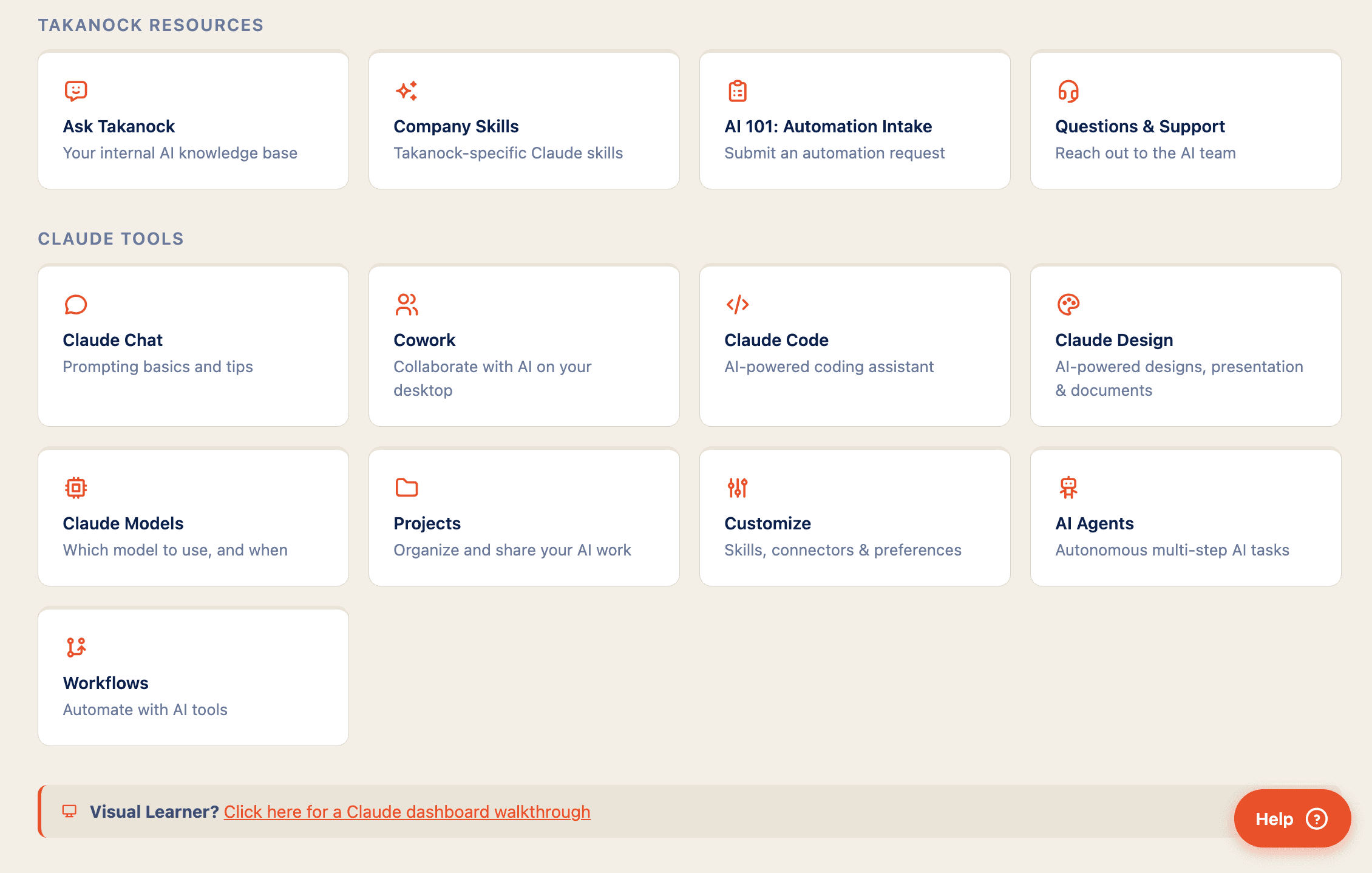
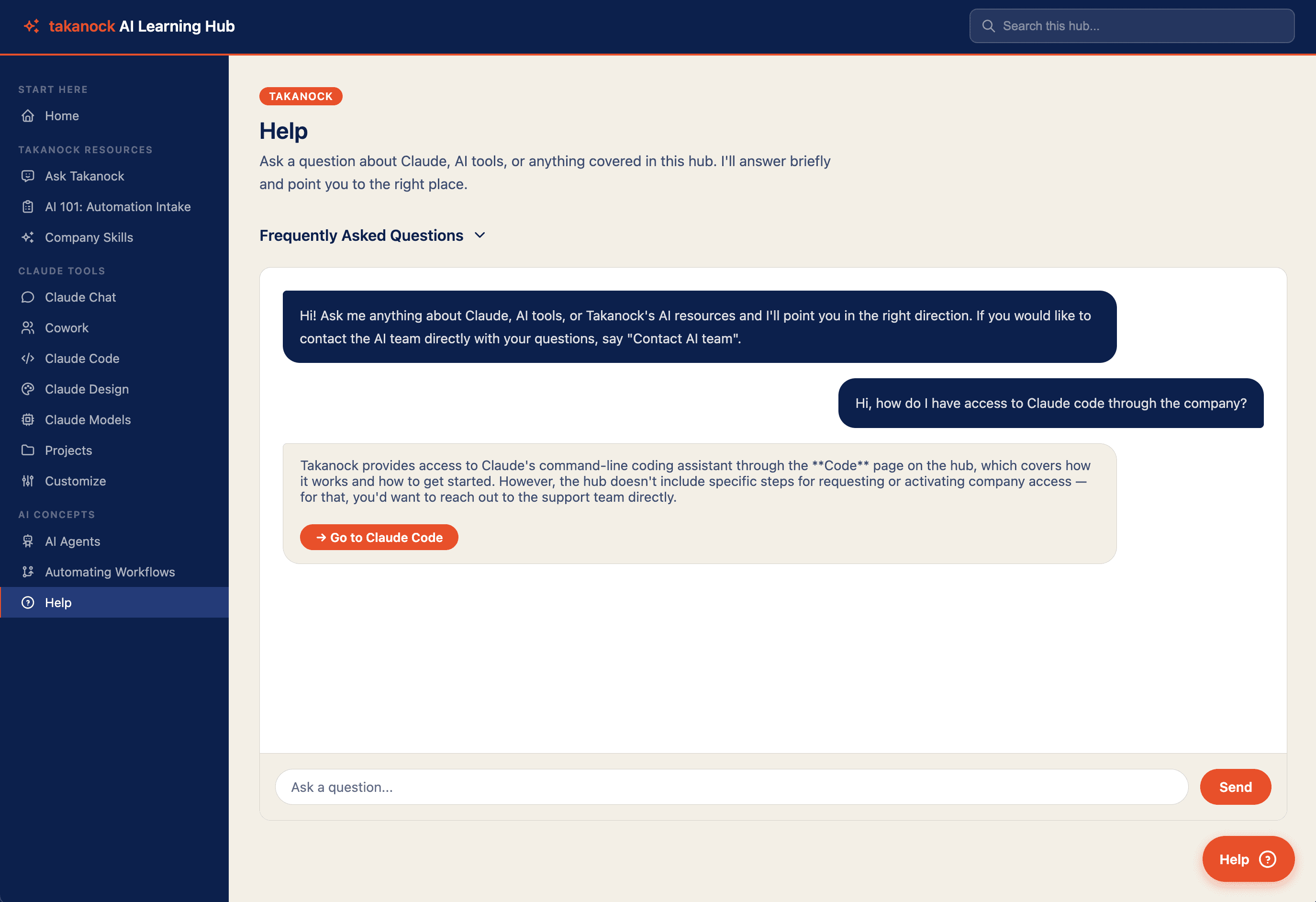
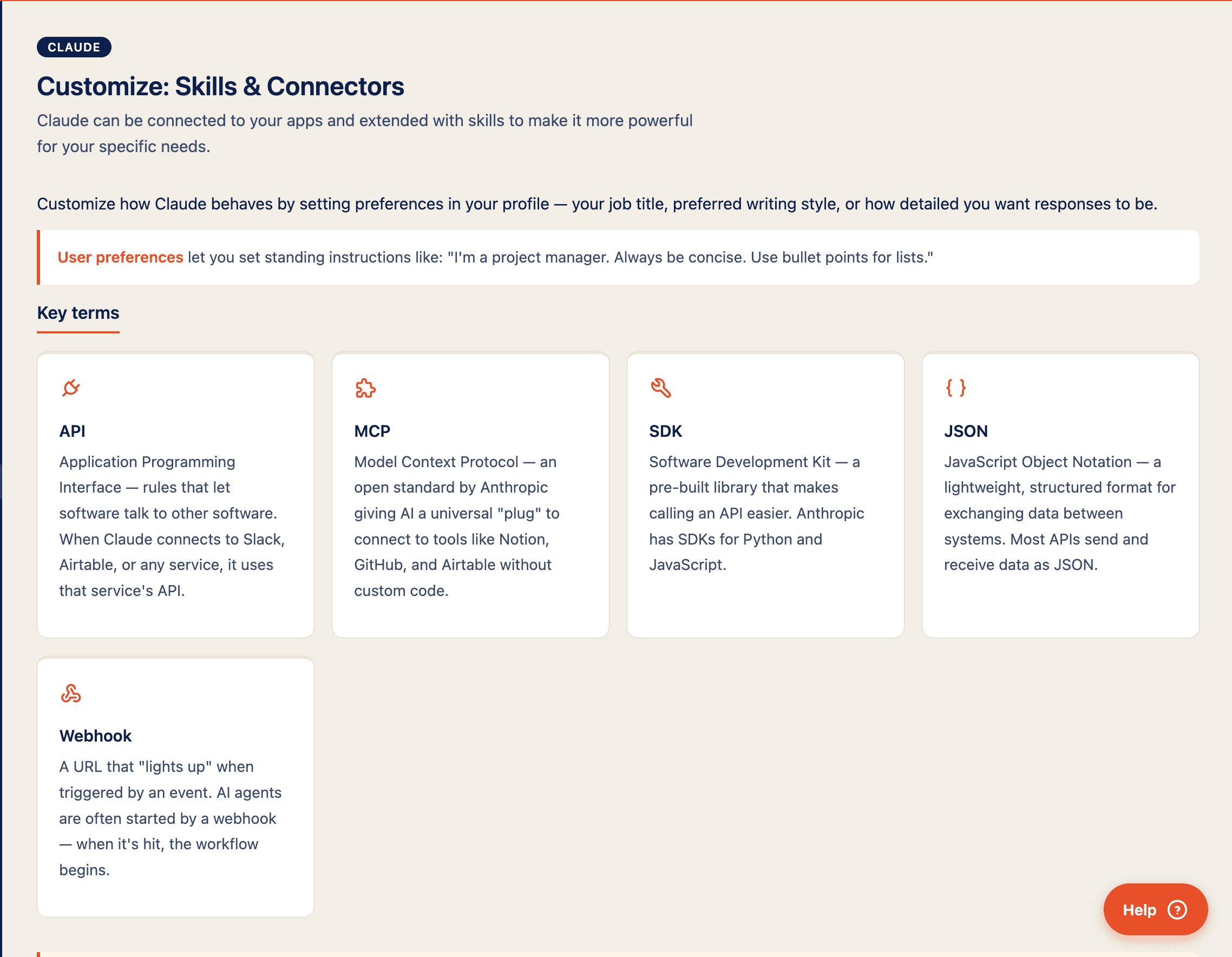
Following the initial design, we shipped a version one to be used company-wide and offered a chance for users to send feedback. This process surfaced several structural gaps I hadn’t caught on my own:
- A responsive layout bug: Camden Brown (Chief Development Officer) pointed out that the site wasn’t adapting properly to wide screens — something I’d missed while focused on optimizing for smaller screens. It was a good check on my own blind spot: I’d been testing on one end of the responsive spectrum and assumed the other end was fine.
- Skills needed grouping, not just listing: Camden pointed out that company skills should be organized by software (PowerPoint vs. Word vs. Outlook, etc.) rather than as a flat list — which pushed me to think about tagging or subgrouping as a way to make the hub organized and understandable.
Through this design process, I also ran into an encoding issue during deployment that corrupted various symbols — including garbled character strings like "—" instead of an em dash. This was a good reminder that “vibe-coded” doesn’t mean untested, and that I always need to have a solid understanding of the basics of HTML in order to review Claude Code’s work.
The solution
I built a plain HTML/CSS/JS site structured as a step-by-step walkthrough of Claude tools, paired with an embedded FAQ-tracking chatbot backed by Airtable. The code is stored in GitHub and hosted through Vercel.
What I learned
A major takeaway I had throughout this process was the disconnect between employees and their superiors. It is easy for a company to throw onboarding material at individuals without realizing how disorganized and complicated the information is. I was excited to speak firsthand with employees and bridge the gaps in the AI learning process. It is easy to assume that everyone learns the same way, which is why it is crucial to receive feedback and build an understanding of how to share important company teaching materials.
That belief showed up directly in how I approached the build. Building the FAQ-tracking chatbot changed how I thought about “finishing” a design; it would have been easy to treat the hub as done once the walkthrough and chatbot were live, but logging every question meant it kept generating its own research after launch, which reframed the project less as a one-time deliverable and more as a system I needed to keep tending.
Moving fast with Claude Code rather than formal wireframes let me test real interaction patterns sooner than a traditional design process would have, but it came with real trade-offs, like fixing bugs after they’d already shipped rather than catching them earlier on paper. If I did this again, I’d build in a lightweight review step before deployment rather than relying entirely on stakeholders to catch what I’d missed.
Not to slow down the process, but to make the feedback loop something I designed for rather than something that happened to me.
Because my internship ended shortly after v1 shipped, I didn’t get to see longer-term outcomes like adoption rates or FAQ trends over time — which is its own lesson in designing for handoff: making sure the Airtable logging and documentation were clear enough that Ivan and the team could keep learning from the tool without me there to interpret it.