Takanock Intake Hub
One front door for IT, GIS, and Automation requests — with AI-driven routing and status tracking
During the summer of 2026, I interned at a startup called “Takanock.” This company is a renewable energy and data center infrastructure company based out of offices in Michigan, Maryland, and Texas. As the industry scales fast, teams at Takanock often grow faster than their internal tools and processes — which is exactly the gap this project addressed.
IT and GIS requests at Takanock were untracked, scattered across Slack and email, with no visibility for the people submitting them or the people fulfilling them. I built a unified intake app that moved the entire experience off Claude entirely — removing the setup barrier that discovery interviews showed was stopping people from using automation tools in the first place.
Overview
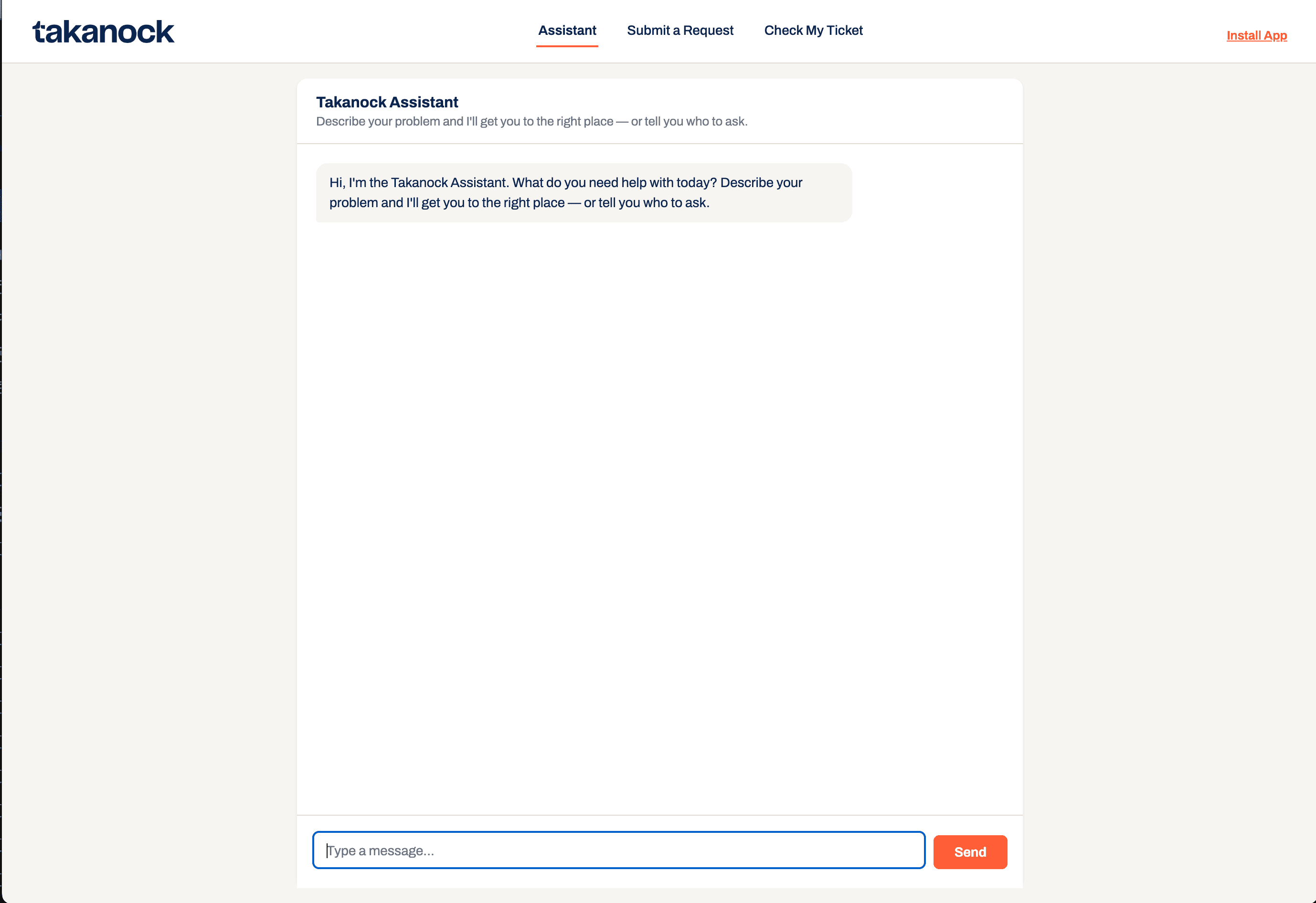
Before this project, IT and GIS (Geographic Information System) requests at Takanock arrived as untracked Slack messages or word of mouth, and automation ideas were submitted through a complex Claude skill. As the company scales from roughly 33 to 50+ people, that fragmentation can become a problem fast. I built the Takanock Intake Hub: a single deployed web app that gives every employee one place to submit IT, GIS, and Automation requests; this application also includes an AI assistant that can tell you who to contact if your issue doesn’t fit any of those categories. This was my official capstone project of my internship at Takanock, and the one where I made the strongest independent decisions about how it should be built.
- Role
- UX Design, Research, Front-end Development, Workflow Design
- Timeline
- Summer 2026 internship (evolved across the full internship)
- Tools
- Next.js (migrated from vanilla HTML/CSS), Airtable, Vercel, Claude API
- Live Site
- takanock-hub-mia.vercel.app
The problem
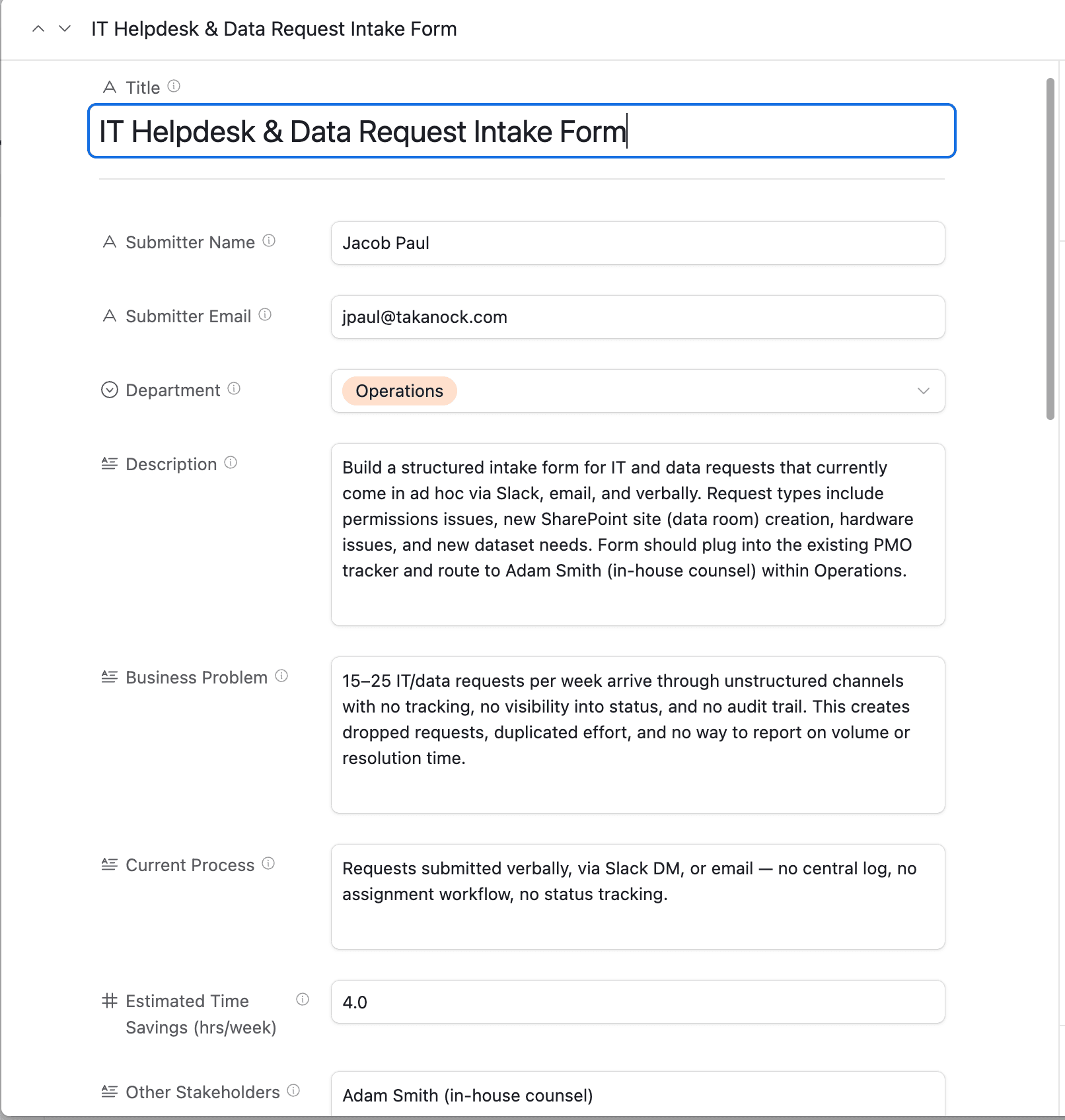
There was no standard way to raise a request, track it, or know who owned it. Two specific gaps, both flagged directly by Jacob Paul (Senior Manager, GIS and Data Systems), began the process of understanding this problem:
- IT and data requests: 15–25 requests per week arrived through unstructured channels — Slack DMs, email, verbal asks — with no central log, no assignment workflow, and no status tracking. Jacob was fielding these requests personally, and they were getting lost across Slack and Outlook notifications without him having time to catalog them. Takanock had also just brought on a new IT hire, Charles, and there was no system in place to smoothly route requests to him either.
- GIS requests from Development: these came in the same way as IT requests — with no standard format. This caused duplicate submissions and unclear scope. There was no routing and no way to categorize work for prioritization and action tracking.
As Takanock scales from roughly 33 to 50+ people, these problems become more apparent — more people meant more untracked requests, with no system to organize, share, and complete the tasks. Further, there was no transparency in the status of open requests for the submitter to view.
Research
This project didn’t start as a usable application, it grew directly out of a request from Jacob: build an intake system that collects both IT and GIS requests into Airtable for his review, so he could better organize incoming work, smooth Charles’s onboarding into IT support, and stop losing track of requests in Slack and Outlook notifications.
Jacob’s original vision was for this to live inside Claude as an internal skill. I made the call to build it as a separate application instead; this decision came from a broader pattern I’d noticed over the internship, backed by real evidence from my discovery interviews. I specifically asked employees whether they’d used the existing automation intake skill in Claude to submit AI requests, and most hadn’t, for one of three reasons:
Didn't know the skill existed
Knew about it, but not how to set it up
Knew about it, but didn't have time to figure out the setup
It wasn’t that people lacked automation ideas worth submitting; it was that the tool asking them to open Claude and configure a skill was the barrier itself. That pattern confirmed what I suspected: it isn’t actually useful for us to build tools that require employees to open Claude, connect the right integrations, and figure out an unfamiliar interface before they can use them.
Our job is to bridge the gap between employees and the tools, not hand people a new tool and a learning curve at the same time.
If the Intake Hub had stayed inside Claude, someone would’ve had to connect their own Airtable, navigate Claude’s interface, and install the skill correctly just to submit an IT ticket — the same setup barrier my interviews had already shown was stopping people from using the automation intake skill. Instead, I did that technical work once, up front, so nobody using the Hub ever has to.
Seeing Jacob’s IT and GIS requests come in through the same underlying pattern was what caused this to be a single project instead of two separate fixes. That’s also when I pitched it as my main capstone project: merging the existing Claude skills into one flow would have just reorganized work I’d already done. The version worth building moved the entire interaction off Claude and onto a deployed web app anyone at the company could use without needing a Claude seat — with Claude still doing the actual processing, just in the background instead of at the front door. It is unfair to require employees to learn new skills just to submit a request to IT, which was the exact reason I was there to help with designing for a better user experience.
Design process
From Claude skill, to standalone app, to unified hub; this project went through three iterations before reaching the final application:
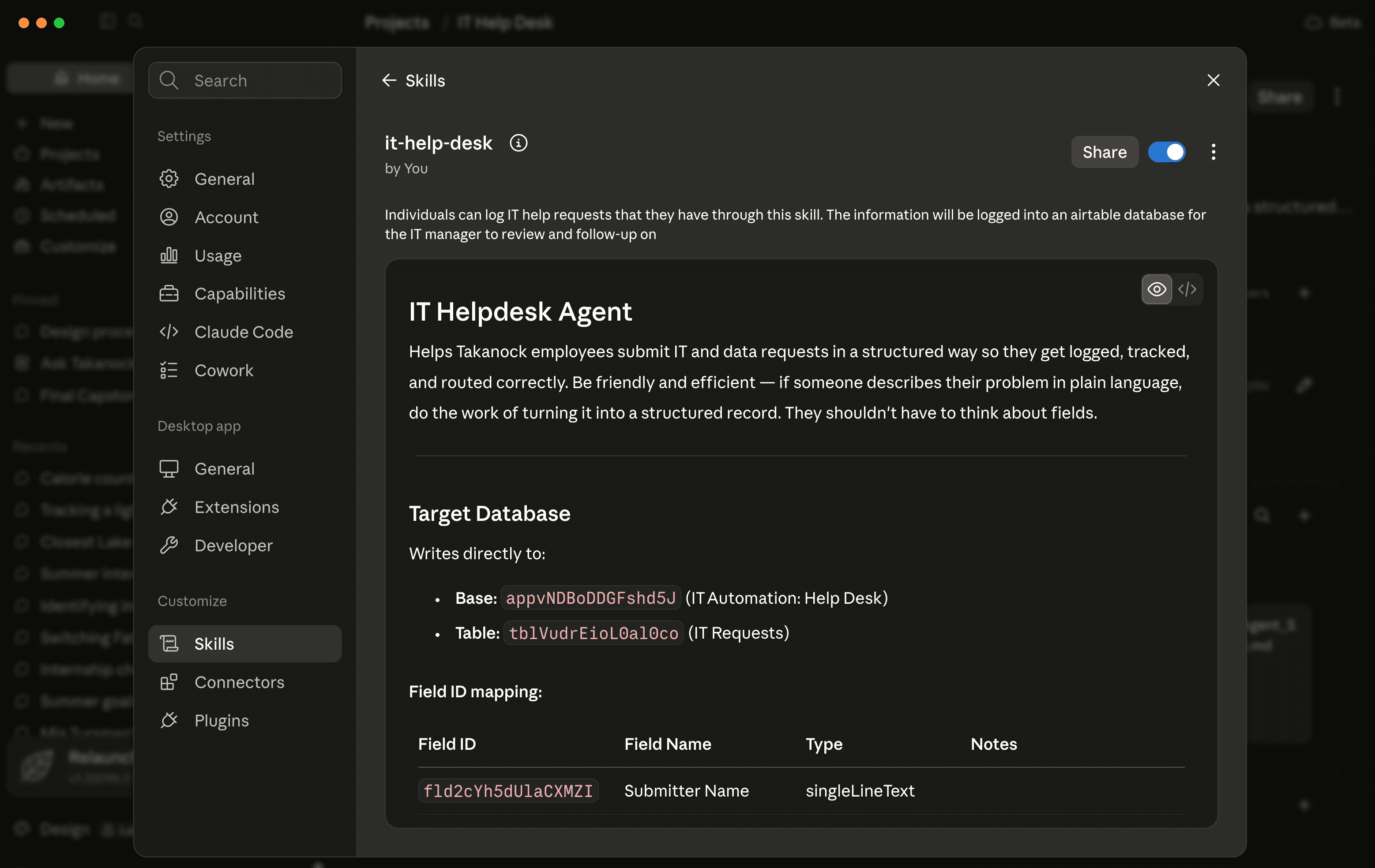
- IT-Help-Desk Claude skill: The earliest version lived entirely inside Claude and was modeled after an existing intake project where users submit AI automation ideas to be reviewed. While this was functional, it was only reachable by people who had an active Claude seat, had the time to set up the Airtable integration manually, and knew how to download the skill.
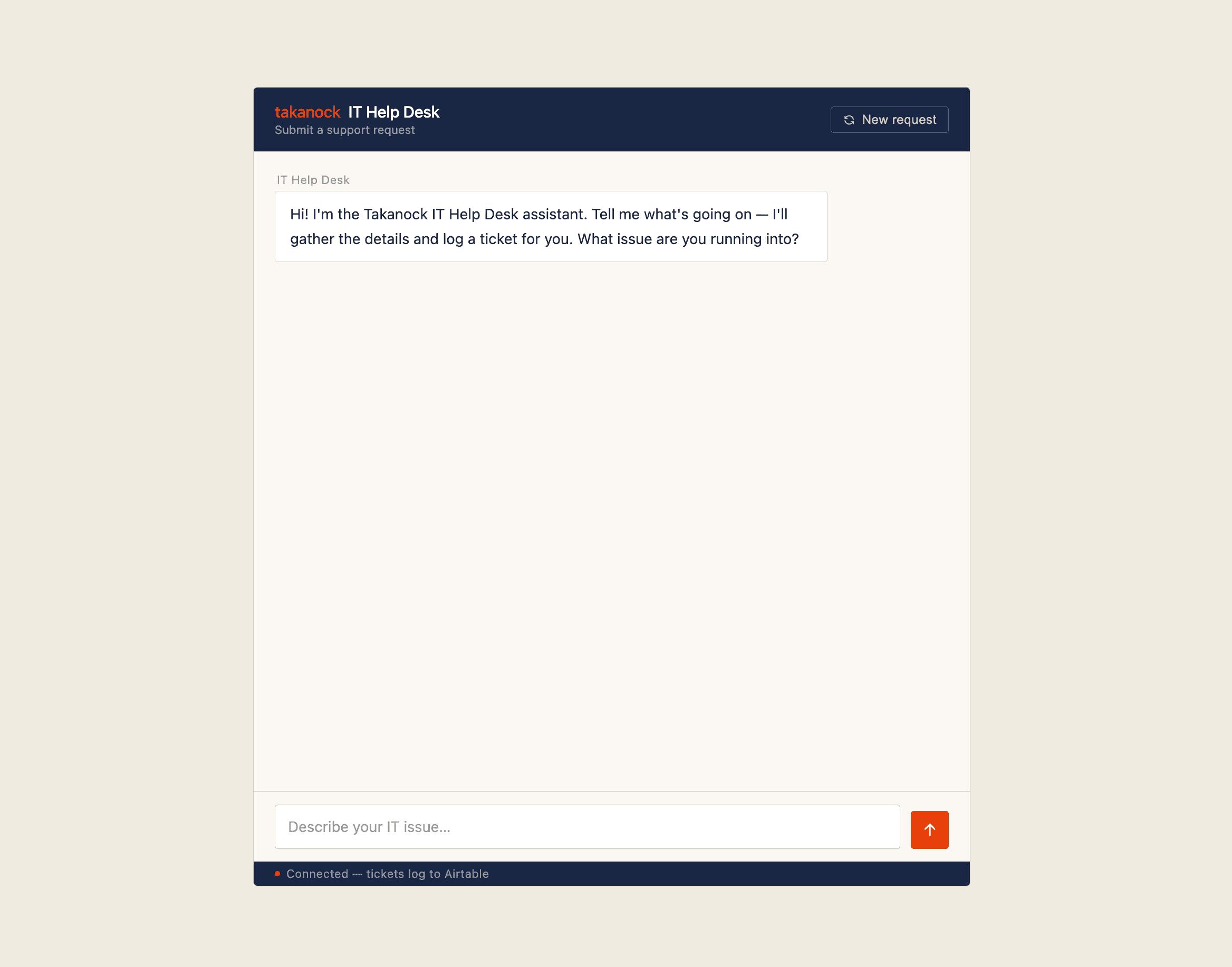
- Standalone IT Help Desk Vercel app: I rebuilt it as its own deployed tool (tak-it-help.vercel.app), so any employee could submit a request through a normal web page with no Claude account required. This version alone handled real requests, with a working Airtable backend and an automated weekly report to stakeholders. However, it was extremely limited as a standalone tool, which proved to be a barrier in widespread usage — the company does not want to implement many standalone, disorganized tools.
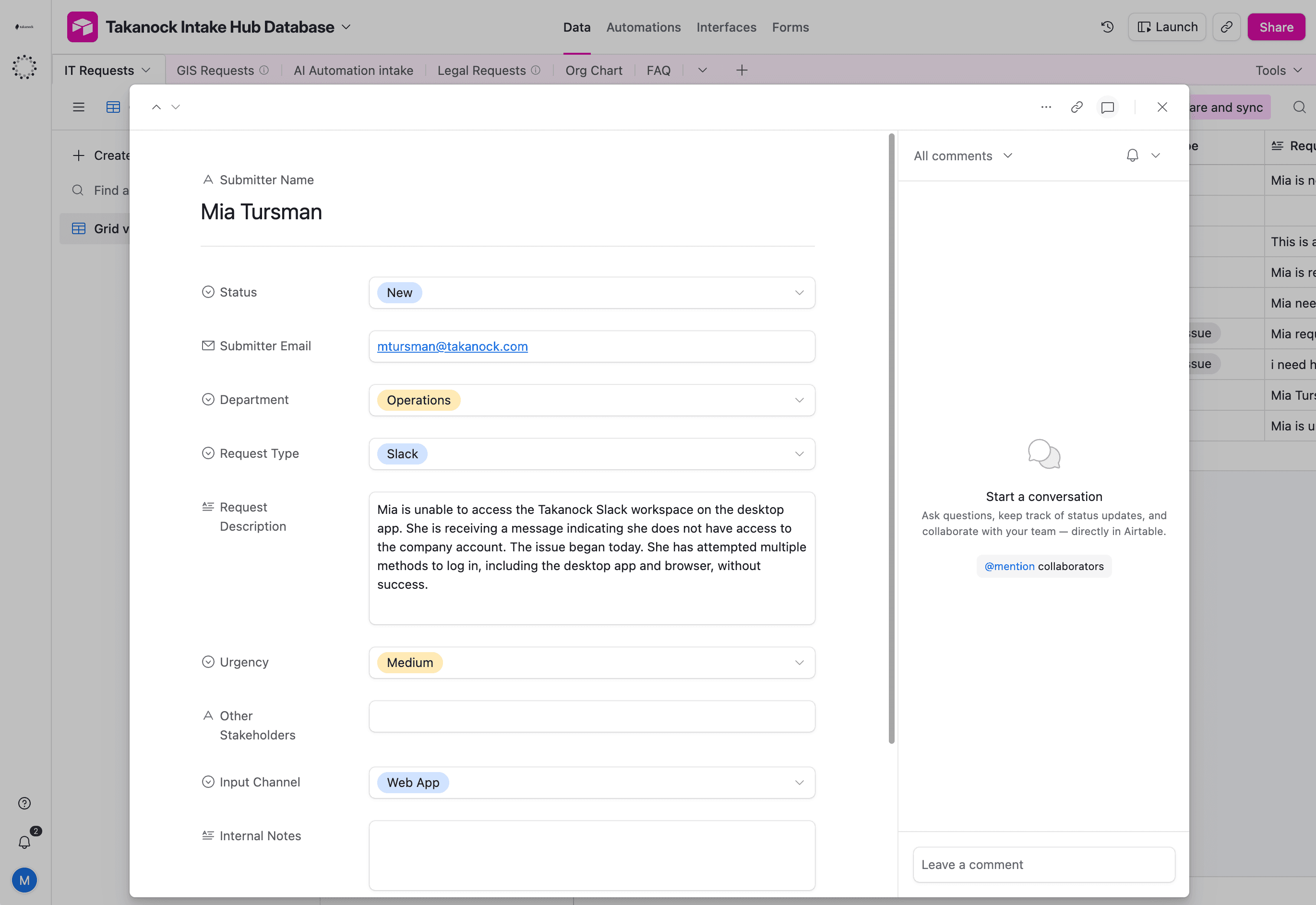
- The unified Takanock Intake Hub: After creating the IT help desk application, I started the GIS intake form, and realized the similarities between them. This gave me the idea to merge them into one app with the option to submit IT, GIS, and even Automation requests. This app also contains an option to chat with an assistant about which category is best for the request, or who to contact if there is not a designated form. Finally, I added a status checker that allows an employee to type in their email address and view the status of tickets they have submitted within the past ten days.
A few decisions that were applied to the final build:
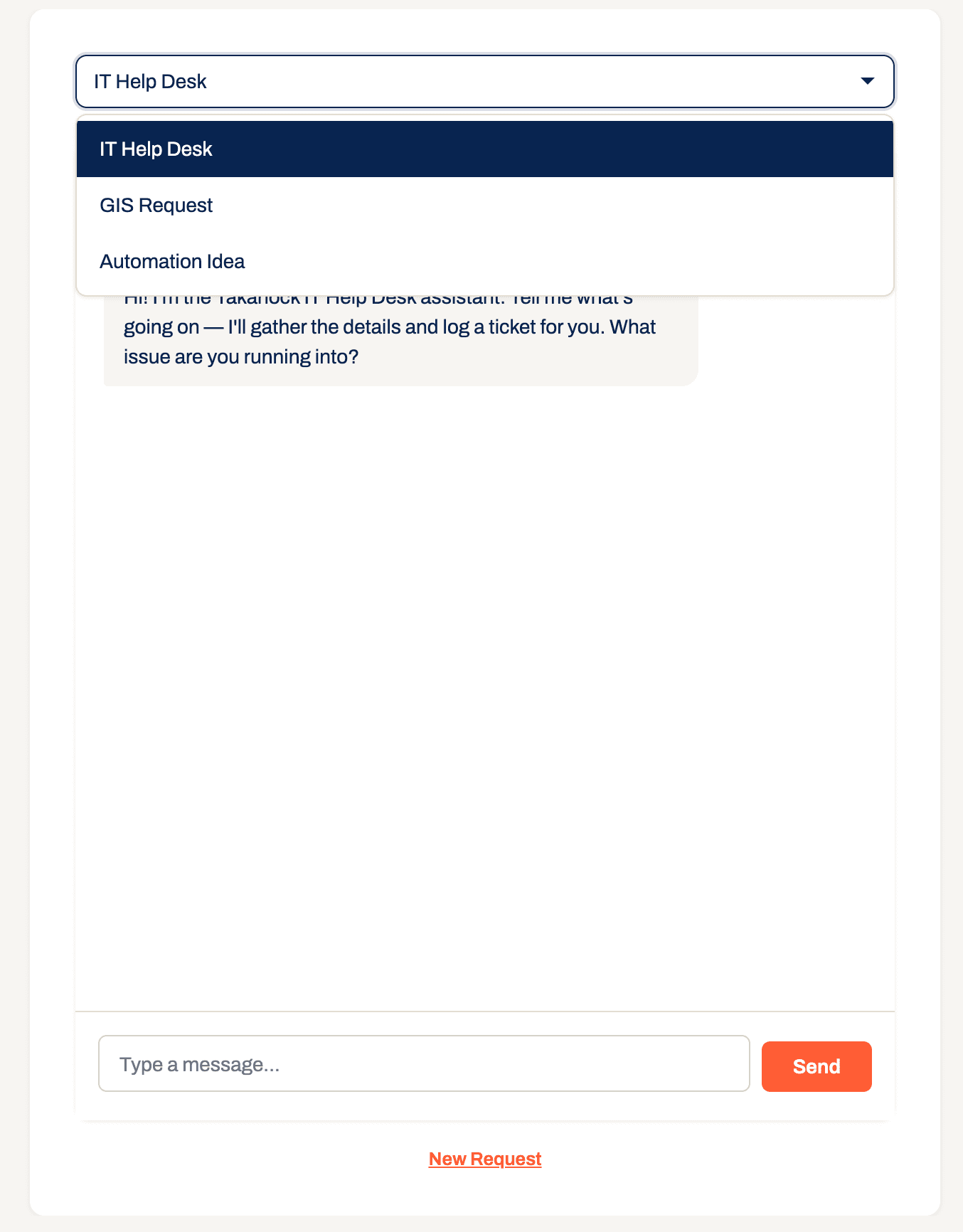
- Chat-based routing: The Assistant tab lets someone describe their issue in plain language rather than picking a category first. This mattered because the whole point of moving off Claude was accessibility; if people still had to correctly guess “is this IT, GIS, or Automation” before they could even start, the tool would fail the people it was meant to help. The Assistant can also tell someone who to contact directly if their issue doesn’t fit any of the three intake types at all — for example, routing a project budget question to the right project director and finance contact instead of forcing it into a form that doesn’t apply.
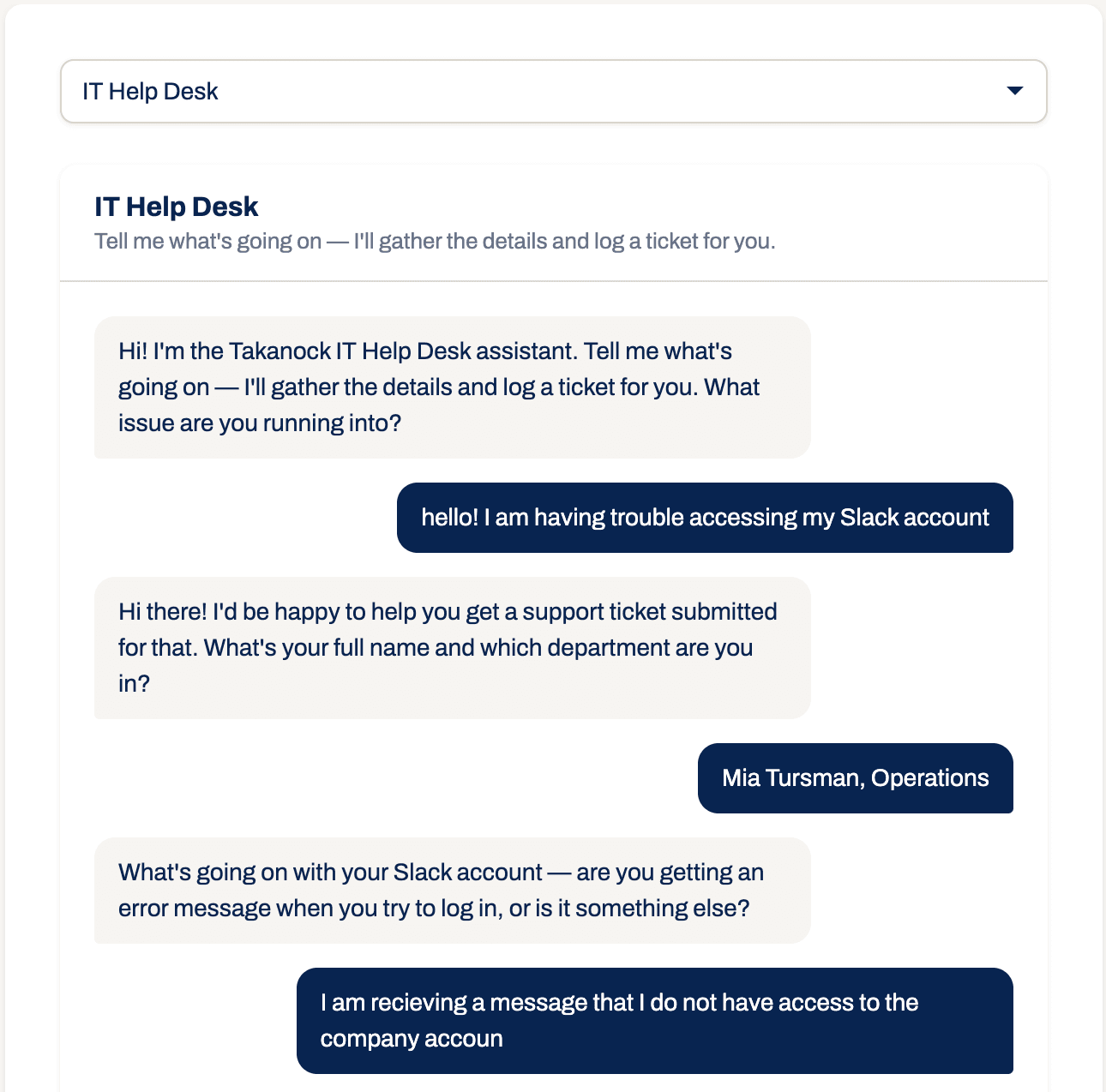
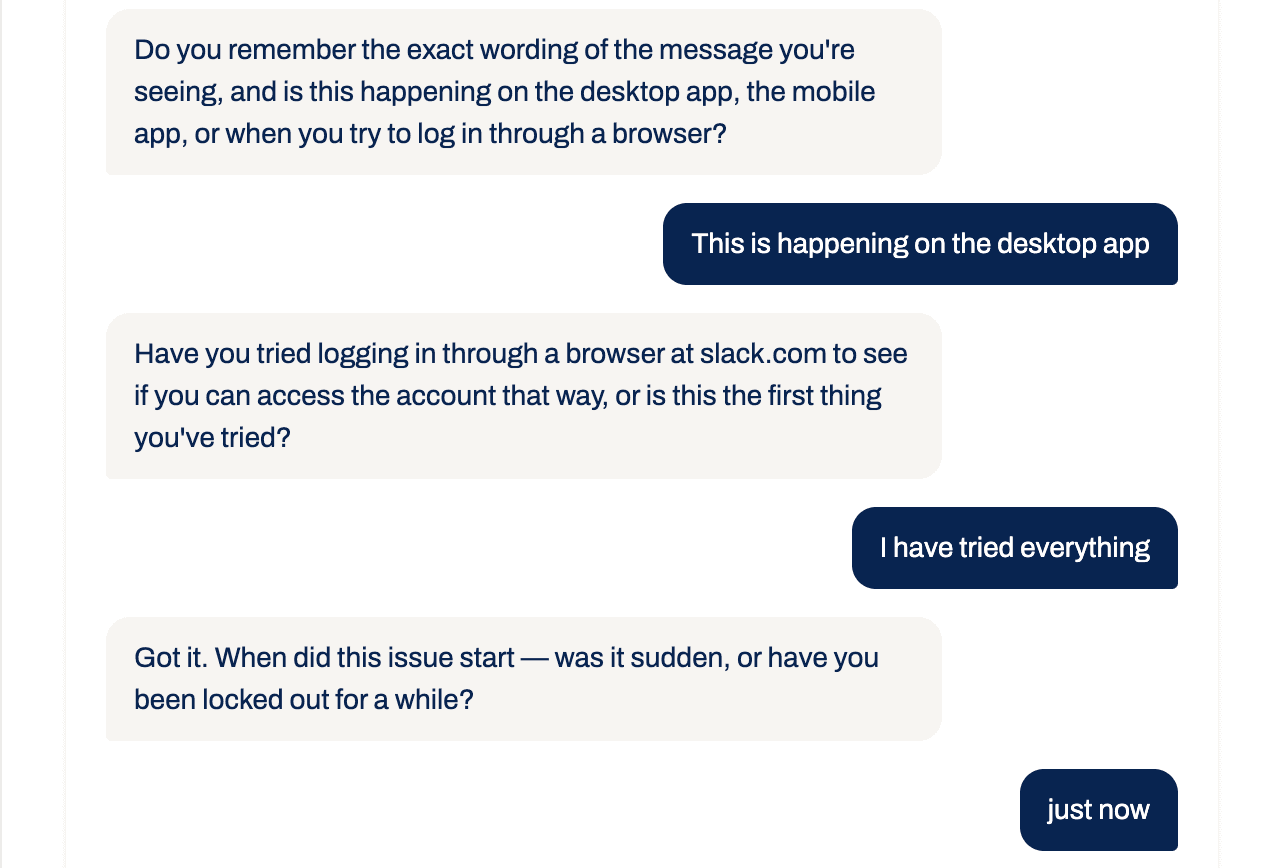
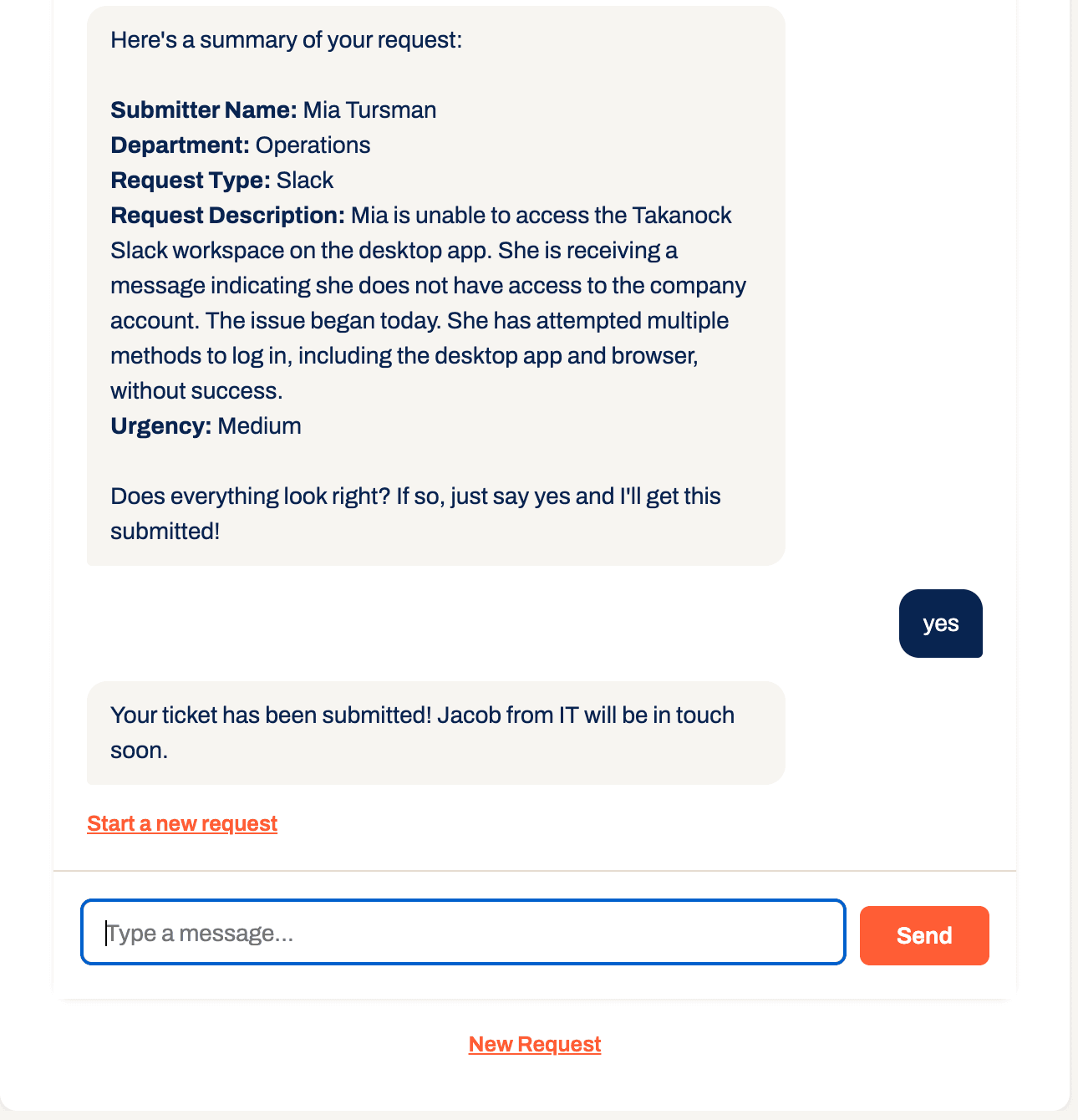
Scroll within the window to see the full conversation
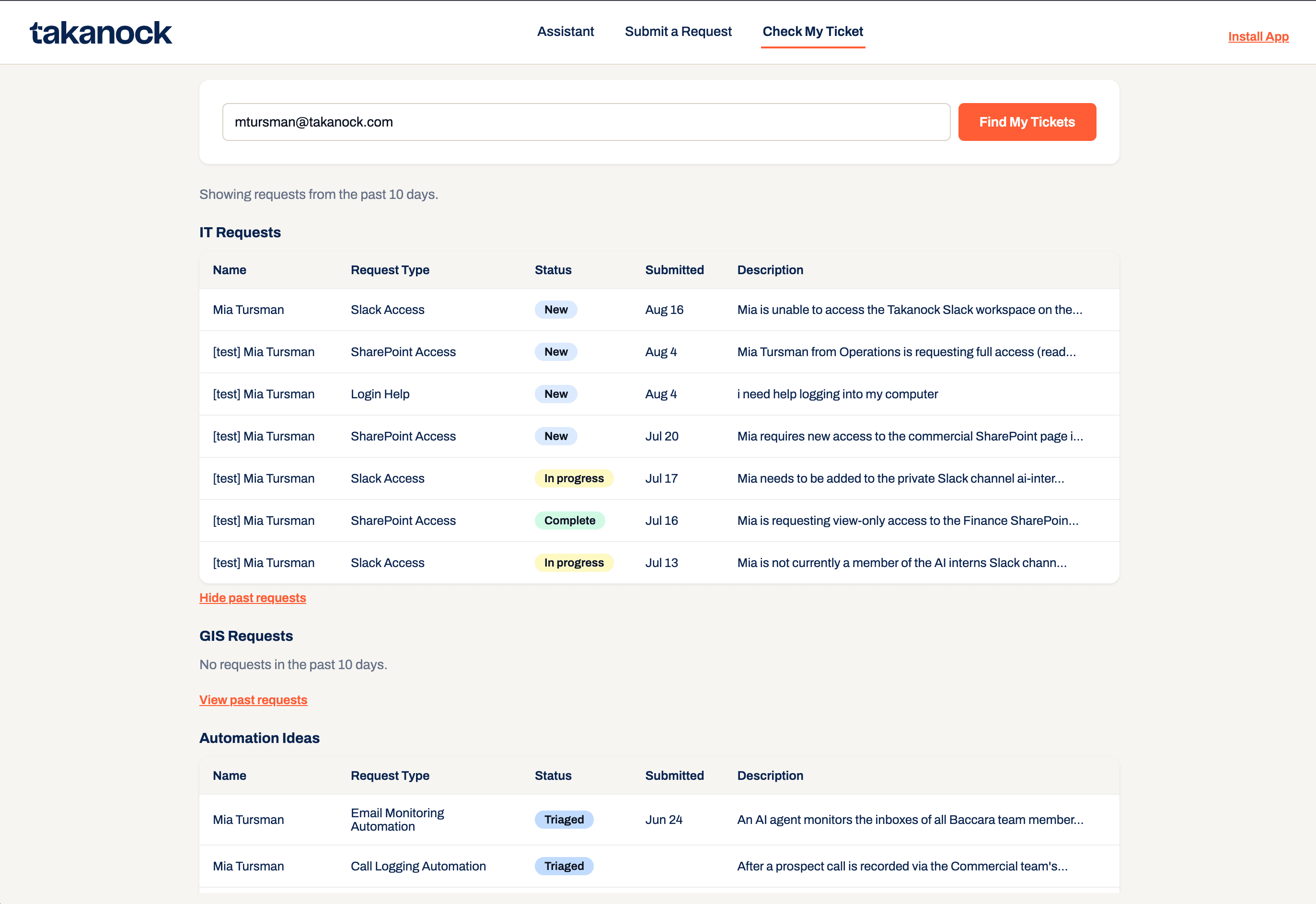
- Status checks:I added the Check My Ticket feature specifically to create transparency between the person requesting help and the team fulfilling it. When discussing the idea with Jacob, we decided it would be helpful for individuals to receive a notification when their request was marked complete; while the notification does still happen, I decided to take this a step further and created a page that pulls the ticket information from Airtable and provides the person the current status of their request. Entering an email surfaces the request’s category, date, description, and current status — this implementation closes the loop that used to end the moment someone sent a Slack message into the void, with no idea whether anyone had even seen it.
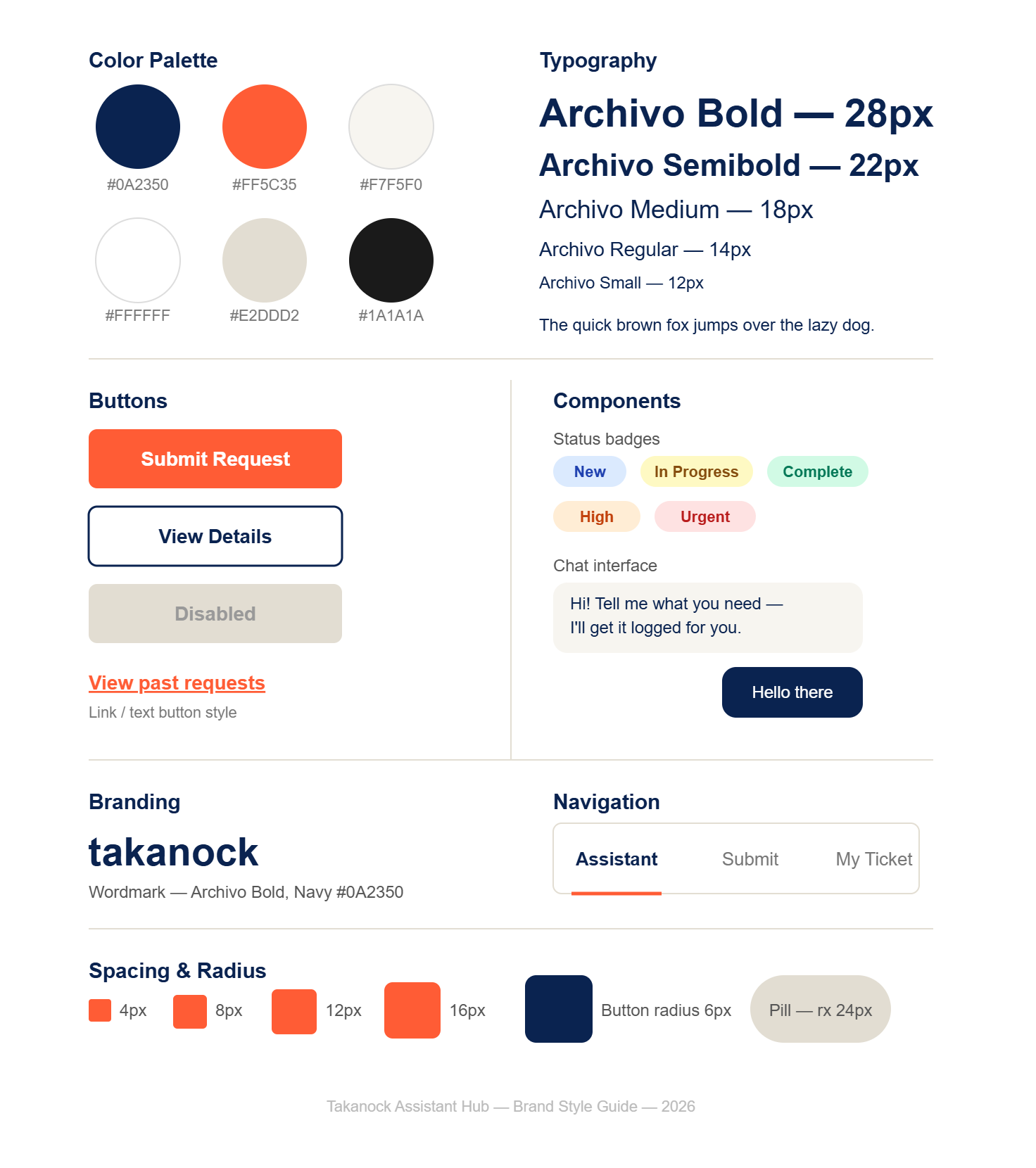
- Migrating from vanilla HTML/CSS to Next.js: The original IT Help Desk app was plain HTML/CSS/JS. As the project grew into a multi-intake hub, I researched what the industry standard was for a maintainable, scalable front end, and Next.js’s component-based structure made it far easier for myself and future editors to adjust and extend individual pieces without touching everything else. I brought this recommendation to my supervisor Ivan Benavides, and he agreed it was the right call before I made the switch.
The solution
The Takanock Intake Hub is a Next.js web app with three tabs: an AI Assistant that routes plain-language requests (or points people to the right contact directly), a Submit a Request form for IT Help Desk, GIS Requests, and Automation Ideas, and a Check My Ticket lookup by email. Each request type writes to its own Airtable base for the correct employee to review, track, and act on. It’s installable as a desktop app directly from the browser, and documented with a full SOP so the system survives past my internship. It’s also built to extend, and new request types beyond IT, GIS, and Automation can be added without redesigning the whole system.
What I learned
Working on the Intake Hub, I learned that our job isn’t to build things that require users to open Claude and figure out which connectors are necessary to make something work — it’s to bridge the gap between employees and the tools. Users don’t want to take the time to learn Claude; we should be building things that run without any learning curve for the people using them. That belief is why I made the call to separate the Intake Hub from the Claude desktop entirely, even though that wasn’t the original ask.
Had this stayed in Claude, people would have had to connect their own Airtable, figure out an often confusing interface, and download the skill correctly. Instead, I did that technical work myself, building an independent application with no learning curve required to use it.
A different kind of ownership than just building what was asked for — trusting my own read of the actual problem over the first proposed solution.
I also really enjoyed learning the ins and outs of developing software using Claude Code through this project. I’m happy I was able to take a fairly simple original task and expand it into something more user-friendly. This was not just functional, but something Jacob and the team could actually rely on to solve the problem they came to me with in the first place.